Pipeline Basics
Vertex Buffer
Triangle vertex data is uploaded to a WebGL buffer and connected to the shader before drawArrays paints pixels.
Program
WebGL shaders do not know where vertices live until JavaScript binds a buffer and describes the attribute layout.
vertex_buffer.html
Visuals: generated teaching cards from captured state
- state written by this keyframe
1<canvas id="stage" width="360" height="210"></canvas>
2<script>
3  const gl = stage.getContext("webgl");
4  const vertices = new Float32Array([
        0.0,  0.62,  0.94, 0.35, 0.28,
       -0.62, -0.52,  0.22, 0.82, 0.55,
        0.62, -0.52,  0.29, 0.55, 0.96
      ]);
5  const buffer = gl.createBuffer();
6  gl.bindBuffer(gl.ARRAY_BUFFER, buffer);
7  gl.bufferData(gl.ARRAY_BUFFER, vertices, gl.STATIC_DRAW);
8  gl.vertexAttribPointer(aPos, 2, gl.FLOAT, false, 20, 0);
9  gl.vertexAttribPointer(aColor, 3, gl.FLOAT, false, 20, 8);
10  gl.drawArrays(gl.TRIANGLES, 0, 3);
11</script>Create interleaved position and color data
kf: 1event 0kind: lifecycleCreate interleaved position and color data.
4const vertices = new Float32Array→ 3 vertices([ 0.0, 0.62, 0.94, 0.35, 0.28, -0.62, -0.52, 0.22, 0.82, 0.55, 0.62, -0.52, 0.29, 0.55, 0.96 ]);
Typed arrays hold compact numeric data before upload. State after this keyframeunset → 3 verticesverticesCreate a GPU buffer object
kf: 2event 1kind: lifecycleCreate a GPU buffer object.
5const buffer = gl.createBuffer→ WebGLBuffer();
A buffer is GPU-side storage selected by bindBuffer. State after this keyframenone → WebGLBufferbufferUpload the typed array into the bound buffer
kf: 3event 2kind: lifecycleUpload the typed array into the bound buffer.
7gl.bufferData→ 15 floats(gl.ARRAY_BUFFER, vertices, gl.STATIC_DRAW);
bufferData copies JavaScript data into GPU-managed buffer storage. State after this keyframeempty → 15 floatsbuffer dataDescribe position and color attributes
kf: 4event 3kind: lifecycleDescribe position and color attributes.
9gl.vertexAttribPointer→ position + color(aColor, 3, gl.FLOAT, false, 20, 8);
Attribute pointers describe how each vertex is packed in the buffer. State after this keyframedisabled → position + colorattributesDraw the three buffered vertices as one triangle
kf: 5event 4kind: lifecycleDraw the three buffered vertices as one triangle.
10gl.drawArrays→ colored triangle(gl.TRIANGLES, 0, 3);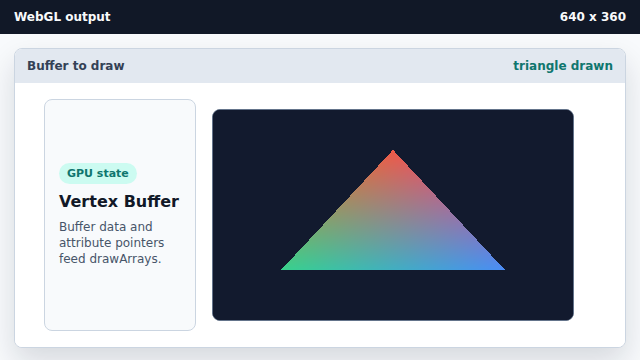
drawArrays runs the active program over the buffered vertices. State after this keyframeclear color → colored triangleframebuffer
typed array
Float32Array stores compact numeric data in the shape WebGL expects.
buffer
A WebGL buffer stores vertex data on the GPU side.
attribute pointer
vertexAttribPointer tells WebGL how to read each vertex attribute out of the buffer.