Primitive Modes
Triangle Strip Primitive
Six vertices form a zig-zag strip of four triangles with a single drawArrays call using gl.TRIANGLE_STRIP.
Program
Triangle strips are compact because each vertex after the first two completes one more triangle. This reduces repeated vertex data in connected meshes.
triangle_strip_primitive.html
Visuals: generated teaching cards from captured state
- state written by this keyframe
1<canvas id="stage" width="360" height="210"></canvas>
2<script>
3  const vertices = new Float32Array([
       -0.78,  0.52,  0.20, 0.83, 0.70,
       -0.78, -0.52,  0.22, 0.47, 0.96,
       -0.08,  0.52,  0.96, 0.72, 0.28,
        0.08, -0.52,  0.96, 0.42, 0.32,
        0.78,  0.52,  0.65, 0.45, 0.96,
        0.78, -0.52,  0.14, 0.76, 0.54
      ]);
4  gl.bindBuffer(gl.ARRAY_BUFFER, vertexBuffer);
5  gl.bufferData(gl.ARRAY_BUFFER, vertices, gl.STATIC_DRAW);
6  gl.vertexAttribPointer(aPos, 2, gl.FLOAT, false, 20, 0);
7  gl.vertexAttribPointer(aColor, 3, gl.FLOAT, false, 20, 8);
8  gl.drawArrays(gl.TRIANGLE_STRIP, 0, 6);
9</script>Store alternating top and bottom vertices
kf: 1event 0kind: lifecycleStore alternating top and bottom vertices.
3const vertices = new Float32Array→ 6 vertices([ -0.78, 0.52, 0.20, 0.83, 0.70, -0.78, -0.52, 0.22, 0.47, 0.96, -0.08, 0.52, 0.96, 0.72, 0.28, 0.08, -0.52, 0.96, 0.42, 0.32, 0.78, 0.52, 0.65, 0.45, 0.96, 0.78, -0.52, 0.14, 0.76, 0.54 ]);
Triangle strips rely on a zig-zag order so adjacent triangles share edges. State after this keyframeunset → 6 verticesvertex orderUpload the strip vertices
kf: 2event 1kind: lifecycleUpload the strip vertices.
5gl.bufferData→ 30 floats(gl.ARRAY_BUFFER, vertices, gl.STATIC_DRAW);
Only six vertices are needed for four connected triangles. State after this keyframeempty → 30 floatsbuffer dataConnect shader attributes to the strip buffer
kf: 3event 2kind: lifecycleConnect shader attributes to the strip buffer.
7gl.vertexAttribPointer→ position + color(aColor, 3, gl.FLOAT, false, 20, 8);
The attribute layout is unchanged even though the primitive mode changes. State after this keyframedisabled → position + colorattributesDraw the connected triangle strip
kf: 4event 3kind: lifecycleDraw the connected triangle strip.
8gl.drawArrays→ TRIANGLE_STRIP(gl.TRIANGLE_STRIP, 0, 6);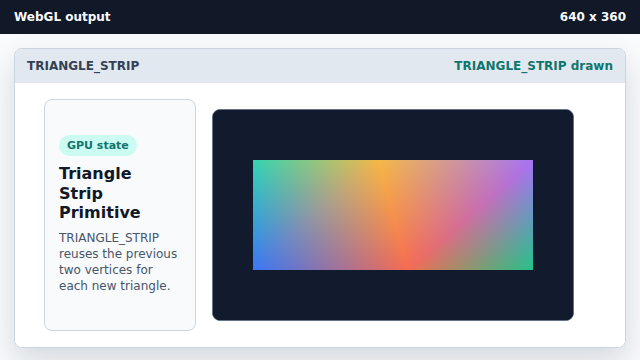
Each new vertex after the first two completes another triangle. State after this keyframenone → TRIANGLE_STRIPprimitive mode
TRIANGLE_STRIP
TRIANGLE_STRIP builds a connected run of triangles from an ordered vertex strip.
vertex reuse
A strip reuses nearby vertices instead of repeating every triangle corner.