Primitive Modes
Triangle Fan Primitive
A center vertex and surrounding ring vertices produce a pie-slice fan with gl.TRIANGLE_FAN.
Program
Triangle fans are useful for radial or convex shapes. The first vertex is reused as the shared center of every triangle.
triangle_fan_primitive.html
Visuals: generated teaching cards from captured state
- state written by this keyframe
1<canvas id="stage" width="360" height="210"></canvas>
2<script>
3  const vertices = new Float32Array([
        0.00,  0.00,  0.98, 0.78, 0.27,
       -0.74, -0.20,  0.20, 0.83, 0.70,
       -0.38,  0.58,  0.22, 0.47, 0.96,
        0.36,  0.62,  0.66, 0.45, 0.96,
        0.74, -0.14,  0.96, 0.42, 0.32,
        0.22, -0.66,  0.14, 0.76, 0.54,
       -0.74, -0.20,  0.20, 0.83, 0.70
      ]);
4  gl.bindBuffer(gl.ARRAY_BUFFER, vertexBuffer);
5  gl.bufferData(gl.ARRAY_BUFFER, vertices, gl.STATIC_DRAW);
6  gl.vertexAttribPointer(aPos, 2, gl.FLOAT, false, 20, 0);
7  gl.vertexAttribPointer(aColor, 3, gl.FLOAT, false, 20, 8);
8  gl.drawArrays(gl.TRIANGLE_FAN, 0, 7);
9</script>Store one center and a ring of vertices
kf: 1event 0kind: lifecycleStore one center and a ring of vertices.
3const vertices = new Float32Array→ center + ring([ 0.00, 0.00, 0.98, 0.78, 0.27, -0.74, -0.20, 0.20, 0.83, 0.70, -0.38, 0.58, 0.22, 0.47, 0.96, 0.36, 0.62, 0.66, 0.45, 0.96, 0.74, -0.14, 0.96, 0.42, 0.32, 0.22, -0.66, 0.14, 0.76, 0.54, -0.74, -0.20, 0.20, 0.83, 0.70 ]);
TRIANGLE_FAN uses the first vertex in every triangle. State after this keyframeunset → center + ringfan verticesUpload the fan vertex data
kf: 2event 1kind: lifecycleUpload the fan vertex data.
5gl.bufferData→ 7 vertices(gl.ARRAY_BUFFER, vertices, gl.STATIC_DRAW);
The final outer vertex repeats the first ring point to close the fan. State after this keyframeempty → 7 verticesbuffer dataDescribe interleaved fan attributes
kf: 3event 2kind: lifecycleDescribe interleaved fan attributes.
7gl.vertexAttribPointer→ position + color(aColor, 3, gl.FLOAT, false, 20, 8);
Colors interpolate from the center out to each fan edge. State after this keyframedisabled → position + colorattributesDraw the triangle fan
kf: 4event 3kind: lifecycleDraw the triangle fan.
8gl.drawArrays→ TRIANGLE_FAN(gl.TRIANGLE_FAN, 0, 7);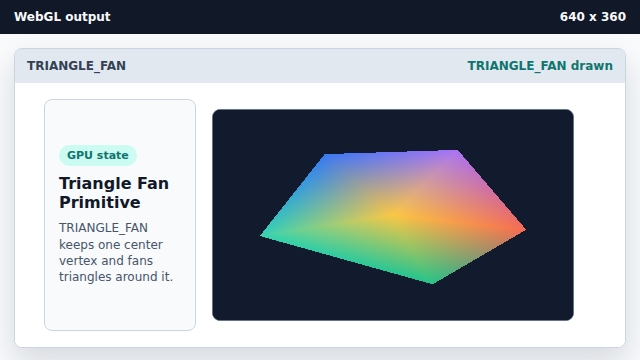
Each triangle uses the center plus two neighboring ring vertices. State after this keyframenone → TRIANGLE_FANprimitive mode
TRIANGLE_FAN
TRIANGLE_FAN reuses the first vertex as the center of each triangle.
fan closure
Repeating the first outer vertex closes a complete fan shape.