Per-Pixel Effects
Smoothstep Circle
A fragment shader computes distance from the center and uses smoothstep to draw a soft-edged circle.
Program
Per-pixel effects often start from a distance field. smoothstep turns an abrupt threshold into a small antialiasing band.
smooth_step_circle.html
Visuals: generated teaching cards from captured state
- state written by this keyframe
1<canvas id="stage" width="360" height="210"></canvas>
2<script>
3  vec2 uv = vUv * 2.0 - 1.0;
4  float dist = length(uv);
5  float edge = smoothstep(0.56, 0.60, dist);
6  vec3 color = mix(vec3(0.12,0.78,0.70), vec3(0.03,0.06,0.16), edge);
7  gl_FragColor = vec4(color, 1.0);
8</script>Center UV coordinates around zero
kf: 1event 0kind: lifecycleCenter UV coordinates around zero.
3vec2 uv = vUv * 2.0 - 1.0→ -1..1;
Centered coordinates make radial distance easy to compute. State after this keyframe0..1 → -1..1uv spaceMeasure distance from the center
kf: 2event 1kind: lifecycleMeasure distance from the center.
4float dist = length→ radial(uv);
A distance field can describe circles and soft masks. State after this keyframeunset → radialdistanceConvert distance into a soft edge mask
kf: 3event 2kind: lifecycleConvert distance into a soft edge mask.
5float edge = smoothstep→ smooth band(0.56, 0.60, dist);
The two threshold values define the soft edge width. State after this keyframehard threshold → smooth bandedge maskDraw the smooth circle color field
kf: 4event 3kind: lifecycleDraw the smooth circle color field.
7gl_FragColor = vec4→ soft circle(color, 1.0);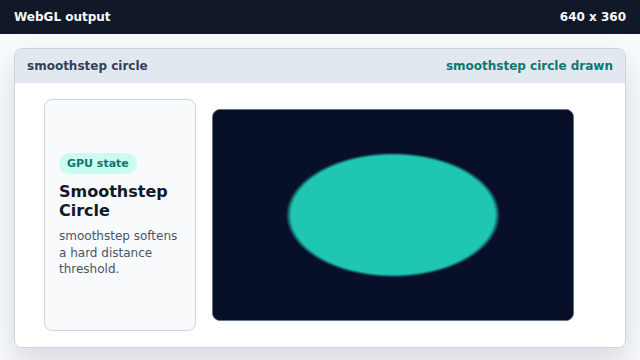
The fragment shader assigns the final color for every covered pixel. State after this keyframeclear color → soft circlepixels
distance field
A distance field stores distance to a shape boundary or center.
smoothstep
smoothstep produces a smooth transition between two threshold values.