Depth and Blending
Alpha Blend Translucent
Blending is enabled so a translucent teal triangle combines with an opaque orange triangle beneath it.
Program
Without blending, a fragment replaces the pixel color. With alpha blending, the source color mixes with the color already in the framebuffer.
alpha_blend_translucent.html
Visuals: generated teaching cards from captured state
- state written by this keyframe
1<canvas id="stage" width="360" height="210"></canvas>
2<script>
3  gl.enable(gl.BLEND);
4  gl.blendFunc(gl.SRC_ALPHA, gl.ONE_MINUS_SRC_ALPHA);
5  gl.drawArrays(gl.TRIANGLES, 0, 3);
6  gl.drawArrays(gl.TRIANGLES, 3, 3);
7</script>Enable framebuffer blending
kf: 1event 0kind: lifecycleEnable framebuffer blending.
3gl.enable→ enabled(gl.BLEND);
Blending is controlled by global WebGL state. State after this keyframedisabled → enabledblend stateChoose source-alpha blending factors
kf: 2event 1kind: lifecycleChoose source-alpha blending factors.
4gl.blendFunc→ src alpha over(gl.SRC_ALPHA, gl.ONE_MINUS_SRC_ALPHA);
SRC_ALPHA and ONE_MINUS_SRC_ALPHA implement normal source-over alpha blending. State after this keyframedefault → src alpha overblend factorsDraw the opaque base triangle
kf: 3event 2kind: lifecycleDraw the opaque base triangle.
5gl.drawArrays→ orange triangle(gl.TRIANGLES, 0, 3);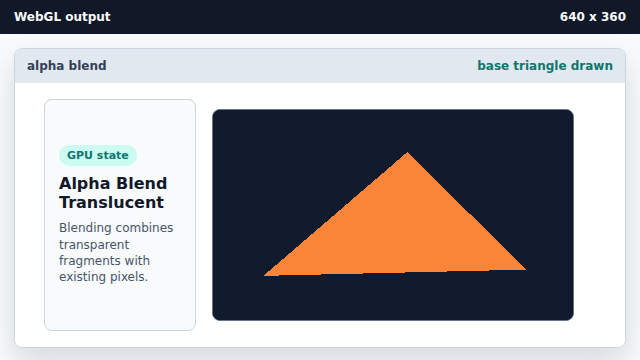
Opaque drawing can establish the destination color that later blending reads. State after this keyframeclear color → orange trianglepixelsDraw a translucent triangle over it
kf: 4event 3kind: lifecycleDraw a translucent triangle over it.
6gl.drawArrays→ alpha blended overlap(gl.TRIANGLES, 3, 3);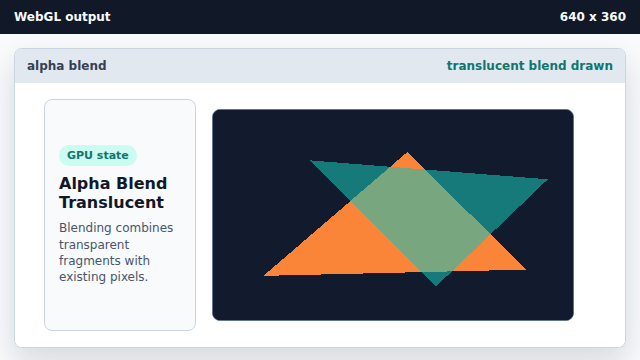
Alpha blending combines source and destination colors using the configured factors. State after this keyframeopaque only → alpha blended overlappixels
alpha
Alpha is commonly used as an opacity value for blending.
blend function
blendFunc chooses how source and destination colors are weighted.