Drawing State
Attribute Colors
Each vertex carries a color attribute, and the fragment shader receives interpolated colors across the triangle.
Program
Attributes are per-vertex input streams. Varyings carry those values from the vertex shader to the fragment shader.
attribute_colors.html
Visuals: generated teaching cards from captured state
- state written by this keyframe
1<canvas id="stage" width="360" height="210"></canvas>
2<script>
3  const vertices = new Float32Array([
        0.0,  0.62,  0.94, 0.35, 0.28,
       -0.62, -0.52,  0.22, 0.82, 0.55,
        0.62, -0.52,  0.29, 0.55, 0.96
      ]);
4  gl.enableVertexAttribArray(aPos);
5  gl.vertexAttribPointer(aPos, 2, gl.FLOAT, false, 20, 0);
6  gl.enableVertexAttribArray(aColor);
7  gl.vertexAttribPointer(aColor, 3, gl.FLOAT, false, 20, 8);
8  gl.drawArrays(gl.TRIANGLES, 0, 3);
9</script>Store position and color for each vertex
kf: 1event 0kind: lifecycleStore position and color for each vertex.
3const vertices = new Float32Array→ x,y,r,g,b([ 0.0, 0.62, 0.94, 0.35, 0.28, -0.62, -0.52, 0.22, 0.82, 0.55, 0.62, -0.52, 0.29, 0.55, 0.96 ]);
Interleaving keeps all data for one vertex together. State after this keyframeunset → x,y,r,g,bvertex fieldsPoint aPos at the first two floats of each vertex
kf: 2event 1kind: lifecyclePoint aPos at the first two floats of each vertex.
5gl.vertexAttribPointer→ x,y fields(aPos, 2, gl.FLOAT, false, 20, 0);
The position attribute uses offset 0 and two floats. State after this keyframedisabled → x,y fieldsaPosPoint aColor at the three color floats
kf: 3event 2kind: lifecyclePoint aColor at the three color floats.
7gl.vertexAttribPointer→ r,g,b fields(aColor, 3, gl.FLOAT, false, 20, 8);
The color attribute uses offset 8 after the two position floats. State after this keyframedisabled → r,g,b fieldsaColorDraw with interpolated vertex colors
kf: 4event 3kind: lifecycleDraw with interpolated vertex colors.
8gl.drawArrays→ interpolated triangle(gl.TRIANGLES, 0, 3);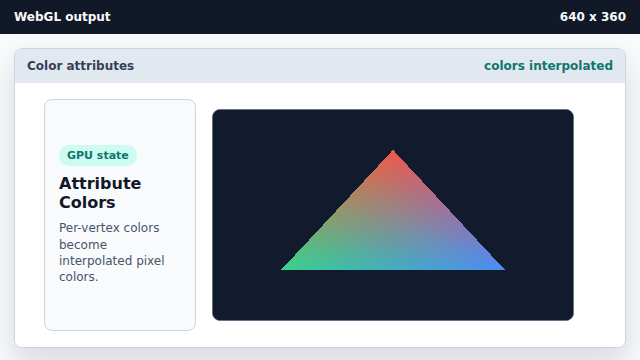
The fragment shader receives interpolated varying color values. State after this keyframeclear color → interpolated trianglepixels
attribute
An attribute is a per-vertex input read by the vertex shader.
varying
A varying carries interpolated values from the vertex shader to the fragment shader.
stride
Stride is the byte distance from one vertex record to the next.