Textbook RSA on a Real Key
Raw RSA with no padding is one modular exponentiation, c equals m to the power e modulo n; pkeyutl computes it on a 512-bit test key, gives the same answer every time, and shows why a padding is needed.
The question
Textbook RSA turns a message into a number m below n and computes c equal to m to the power e, modulo n. To decrypt, compute c to the power d, modulo n. The toy lessons of this track did that with numbers below 100. What changes with a real key file, and what does OpenSSL do when it is told to add no padding at all?
The numbers are now 512 bits long, 64 bytes. They do not fit the integers of the page's programs, which stop at 2 to the power 53, so every step here is an OpenSSL command. This page uses raw RSA to show what padding is for. It does not recommend it.
Work it by hand
Take the three-byte message hi!, which is 68 69 21 in hexadecimal, the number 6,842,657. The key has a 64-byte modulus, so the message is written as 64 bytes, 61 zero bytes and then 68 69 21. The number is the same; it is just written with leading zeros, and it is far below n.
- Encrypt: c equals m to the power 65537, modulo n. Since 65537 is 2 to the power 16 plus 1, this takes 16 squarings and one multiplication, each followed by a reduction modulo n, so no number grows beyond 1024 bits. Without the reductions, m to the power 65537 would have more than a million bits.
- Decrypt: m equals c to the power d, modulo n. The private exponent d has about as many bits as n, so this takes about 500 squarings: more work than encrypting, which is why a small public exponent is used.
- The result is a number below n written as 64 bytes. Decrypting the ciphertext must return the 61 zero bytes and 68 69 21.
The book modular-exponentiation shows the square-and-multiply steps on small numbers.
Run it
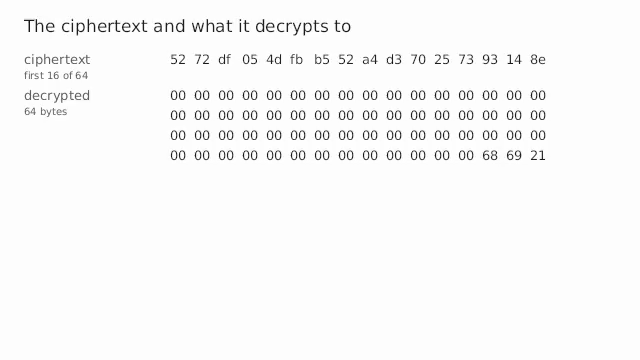
The command decrypts the 64 bytes in in/ciphertext.bin with the private key in in/key.txt, which is test material, the key carol of these lessons. -pkeyopt rsa_padding_mode:none says that no padding is removed: the output is the whole 64-byte number. The 64 bytes are written to out.bin.
The picture shows the ciphertext and the 64 bytes that came out. They end with 68 69 21, hi!, and the 61 bytes before them are zeros.
Public test material, generated for this lesson. Never use it for anything real.
# Reads the private key in in/key.txt and the ciphertext in in/ciphertext.bin.
# Writes 64 bytes to out.bin.
pkeyutl -decrypt -inkey in/key.txt -pkeyopt rsa_padding_mode:none \
  -in in/ciphertext.bin -out out.bin
{
  "answer": "00000000000000000000000000000000000000000000000000000000000000000000000000000000000000000000000000000000000000000000000000686921",
  "file": "out.bin",
  "bytes": 64
}
You can change the ciphertext to hexadecimal text of up to 64 bytes whose number is below the modulus; a shorter text is read as a number with leading zeros, so 63 bytes of ff still run, and the output is always 64 bytes.
64 bytes of ff are not below the modulus and stop the command with "Public Key operation error: data too large for modulus"; 65 bytes stop it with "Public Key operation error: data greater than mod len", and an empty text with "Public Key operation error: data too small". A text that is not a private key stops it with "pkeyutl: Error loading key", and a public key with "pkeyutl: Error loading key: unsupported".
Your turn
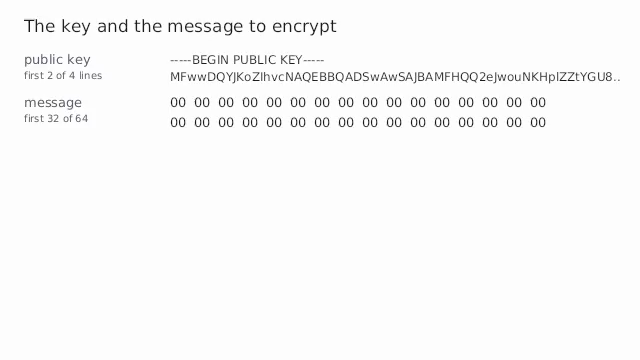
The command below should encrypt the 64-byte message in in/message.bin with the public key in in/key.txt, using raw RSA, and write the 64 bytes of the ciphertext to out.bin. Decide whether it does, and edit it so that it does. Check runs your command on the data shown and on four others: other messages, and in two of them another key.
Public test material, generated for this lesson. Never use it for anything real.
# Reads the public key in in/key.txt and the message in in/message.bin.
# Writes 64 bytes to out.bin. Check runs it with other keys and messages.
pkeyutl -encrypt -pubin -inkey in/key.txt -in in/message.bin -out out.bin
{
  "message": "Public Key operation error: data too large for key size"
}
Write one command that encrypts the 64-byte file in/message.bin with the RSA public key in in/key.txt using raw RSA, with no padding, and writes the 64-byte result to out.bin. Check runs your command with other keys and messages in those files; every message is 64 bytes with a first byte of zero, so it is below the modulus.
Read the result carefully
Raw RSA has no randomness: the same message under the same key gives the same ciphertext on every run, so anyone can tell that two ciphertexts carry the same message, and a guess at a short message can be checked by encrypting it. Padding adds a random part before the exponentiation; the next lessons show two kinds.
The encryption input must be exactly as long as the modulus: a message of 63 bytes stops it with "data too small for key size". A real program does not choose such a message by hand. This page does not show how padding is added or removed, key sizes in use, or how keys are protected, and the test keys here must never protect anything real.
Recap
- Raw RSA is c equal to m to the power e, modulo n, on a message written as a number below n.
- With no padding the output is as long as the modulus.
- It gives the same ciphertext every time; padding is what adds randomness.
- 512-bit RSA is a real algorithm at a size far too small to use.