Verify Says Yes or No
Verification gives one of two answers and no reason; a wrong key, a changed message and a changed signature digit all produce the same failure, and a program that scans signed lines finds the first valid one.
The question
You hold a public key, a message and a signature. You ask: is this signature valid? The check answers yes or no. If it says no, it does not say why: the signature may be for another message, made with another key, or damaged on the way. Can you tell which from the answer? You cannot, and this lesson shows it.
The key in this lesson, the Ed25519 signer key, is test material made for these lessons. The message and its signature are fixed.
Work it by hand
Verification recomputes what the signature should equal from the public key, the message and the first half of the signature, R, and compares. RFC 8032 section 5.1.7 gives the steps for Ed25519. The only result is that the two sides agree or do not.
- The message is
release 1.4.2 is readyand a line feed, 23 bytes. The signature is 64 bytes, R then S. - If the message changes by one byte, the hash that goes into the check changes, and the sides disagree.
- If one bit of the signature changes, R or S changes, and they disagree.
- If another Ed25519 public key were used, the check would use another point, and they would disagree (stated here, not run: the test material holds one Ed25519 key).
All three failures look the same from outside. The check has no way to say which input was wrong, because from its point of view they are one case: the signature is not valid for this key and this message.
Run it
The command checks the signature in in/sig.bin against the message in in/message.txt with the public key in in/pub.txt. -rawin hands over the whole message, and -sigfile names the signature file.
For the fixed test values the command prints Signature Verified Successfully and ends with exit code 0.
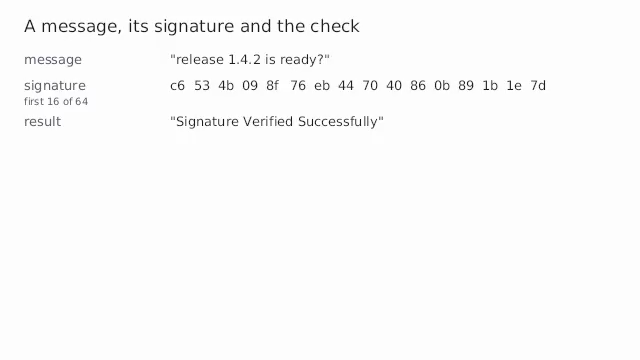
Public test material, generated for this lesson. Never use it for anything real.
# Reads the public key in in/pub.txt, the signature in in/sig.bin
# and the message in in/message.txt.
pkeyutl -verify -pubin -inkey in/pub.txt -rawin -in in/message.txt \
  -sigfile in/sig.bin
{
  "answer": "Signature Verified Successfully"
}
You can change the message or the signature. A message that differs by one byte, a missing line feed, a signature with one digit changed and a signature of the wrong length each stop the command with the same message, "OpenSSL: provider signature failure" (the command itself prints Signature Verification Failure and exits with code 1, which the page does not show). A public key of another kind stops it with another message, for example "pkeyutl: Error initializing context: operation not supported for this keytype".
Your turn
The program below should find the first valid signature in a list. pairs holds one line for each pair, a message, a bar and a signature in hexadecimal; key is the Ed25519 private key text. Return the number of the first line, counted from 0, whose signature is valid for its message, or -1 if no line is. Decide whether it does, and find the candidates that do. Check runs each candidate on the data shown and on five others.
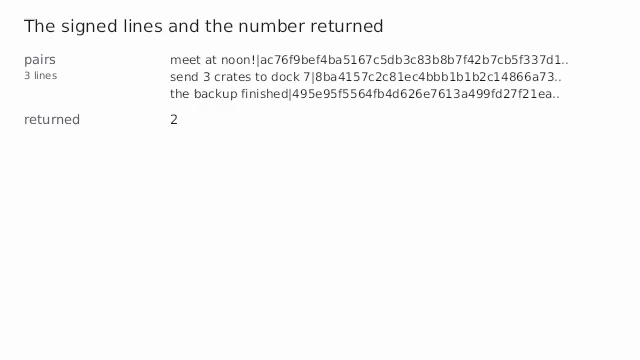
Public test material, generated for this lesson. Never use it for anything real.
let k = ssl.parse_key(key);
let lines = str_split(pairs, "\n");
let answer = 0 - 1;
for (i in range(0, lines.len())) {
  let parts = str_split(lines.at(i), "|");
  let valid = k.verify("", parts.at(0), parts.at(1));
  if (answer < 0) { if (valid) { answer = i + 1; } }
}
{
  "answer": 2
}
key is the text of an Ed25519 private key; pairs is text with one line per pair: a message, a bar, the signature in hexadecimal. A message contains no bar. Return the number of the first line, counting from 0, whose signature is a valid signature of its message under that key. Return -1 if no line has one.
Read the result carefully
The answer yes means this signature was made with the private key for exactly this message. It does not say who holds the key, when the signature was made, or whether the message was sent before. The answer no is less informative: it does not separate a forged signature from a transmission error.
In the page's programs Key.verify returns false for a signature of the wrong length and does not stop; a program does not need to guard against that. A line with no bar, or a signature with an odd number of digits or a character that is not a hexadecimal digit, does stop the run. The page does not show how a verifier learns which public key belongs to whom, which is what certificates are for, or any timing. The test key is public and must never protect anything real.
Recap
- Verification answers yes or no and nothing more.
- A wrong message, a damaged signature and a wrong key give the same failure.
- The command prints
Signature Verified Successfullyand exits with code 0, orSignature Verification Failureand exits with code 1; the page shows the failure as a stopped run. - A yes proves the key's holder signed these exact bytes, not who the holder is.